
One video
$8.98 USD
$8.98 per video
- One photo per video
- Your own hair and outfit
- 30 s · 4:3 + 9:16 · 720p
- Lines and music, no watermark
- Private order and email link
- Unused credits never expire
30-second farewell · 1 photo · Sound on
Upload one photo and become the player in the viral Goodbye GTA 5 scene: on a sunset pier Michael, Franklin and Trevor hand you the new GTA and the car keys, Trevor grabs your shoulder, you hold back tears and drive off down the coast. You get the full 30-second 720p video with the original lines and music, plus a 9:16 copy for TikTok. Usually ready in 5–15 minutes. From $8.98, no login.
Make yours
No prompt, no CapCut template, no editing. The pier, the three characters, the camera, the lines and the music are built in. Add your photo: you appear with your own hair and the outfit from the photo.
Watch and download on your private order page or from the email link. Photos are deleted within 7 days.
Compare before you pay
Most Goodbye GTA 5 generators give you a short vertical crop and swap the soundtrack for stock music. Here you get the whole scene as it was made, with its lines and music, and still get a vertical copy.
| GTA 5 Goodbye AI | Other Goodbye GTA 5 tools | |
|---|---|---|
| Length | 30 seconds, the full scene: the GTA case and the car keys, the shoulder grab, the tears, the drive | gta5goodbye.com: 13 s. goodbyegta5.com: 6, 10 or 15 s. goodbyegta.com: 15 s or 29 s (29 s costs 1,936 credits at 720p). |
| Sound | The scene’s music and both lines: “Take care, kid.” and your “Thanks.” | goodbyegta5.com: AI instrumental, no vocals. gta5goodbye.com: template music. |
| Format | Cinematic 4:3 original plus a 9:16 vertical copy, both included | goodbyegta5.com and gta5goodbye.com: 9:16 only. goodbyegta.com: 4:3 only. |
| Photos | One photo; you keep your own hair and outfit, no childhood photo needed | gta5goodbye.com: a selfie plus an optional childhood photo. goodbyegta5.com: 1 photo of a person or pet. |
| Price | One-time packs, from $8.98 for the full 30-second video; no credit maths | gta5goodbye.com: $8.99 per 13 s video. goodbyegta5.com: 20 credits ($9.90 pack) for 15 s. goodbyegta.com: credit packs. |
| Account | No login: private order page and email link | goodbyegta5.com and goodbyegta.com require sign-in. |
Competitor specs come from their public product pages, checked on 18 November 2026. We did not run paid generations on those tools.
The scene
“Take care, kid.” — “Thanks.”
GTA V came out on 17 September 2013; GTA VI is scheduled for 19 November 2026. The farewell videos mark those 13 years in Los Santos. Your video re-creates this AI-made scene with your face as the player.
Sources: Grand Theft Auto V, Wikipedia · Grand Theft Auto VI, Wikipedia · Bubbleblabber: Saying Goodbye to Los Santos (Nov 2026)
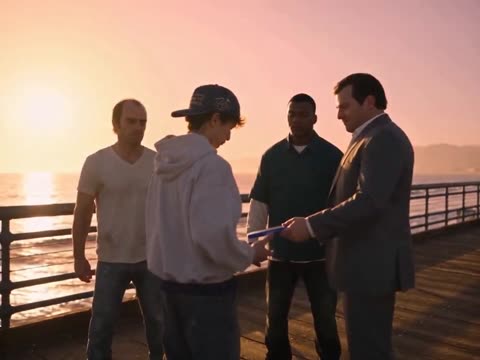
On the pier at sunset, Michael, Franklin and Trevor stand with you and hand over the new GTA case: “Take care, kid.”
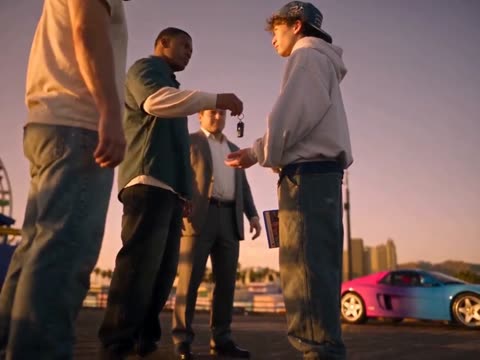
Franklin drops the car keys into your hand; the pink sports car waits on the pier.
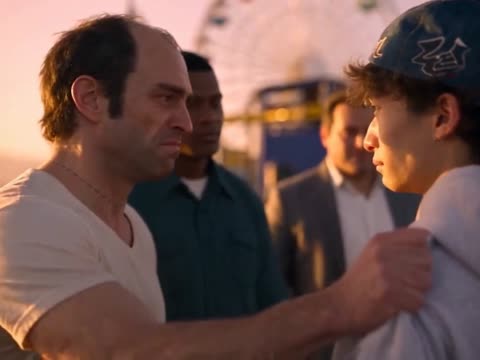
Trevor grips your shoulder, Franklin and Michael behind him.
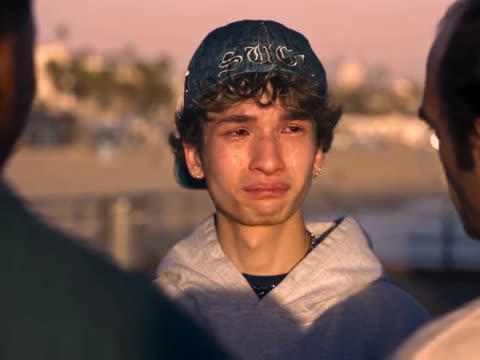
A close-up of you, eyes wet. You answer: “Thanks.”
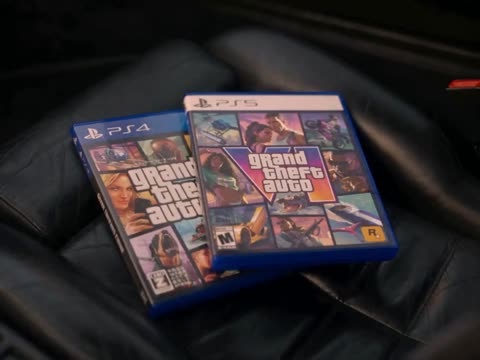
In the car, GTA V and GTA VI go side by side on the passenger seat, and you start the engine.
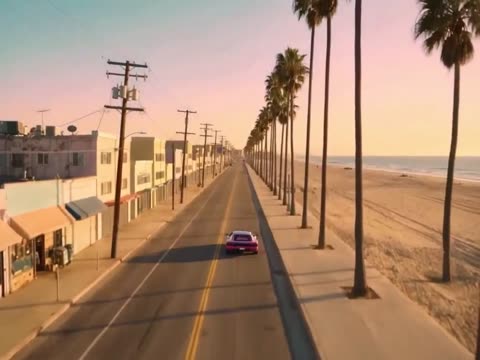
The three watch you go, then an aerial shot follows the car down a palm-lined road by the sea.
How it works
You only choose the photo. The scene, the three characters, the camera, the lines and the music are already set.
A clear, front-facing photo of one person, waist-up if you can. That person becomes the player who says goodbye, with the hair and outfit from the photo.
Confirm you may use the photo, enter the email for delivery and pick a pack. No account, no prompt.
Your video starts as soon as payment is confirmed and keeps going if you close the page. It is usually ready in 5–15 minutes, and we email you when it is done.
Download the 30-second 4:3 original and the 9:16 vertical copy, both with sound, and post to TikTok, Reels, Shorts or the group chat.
Photo tips
Several shots are close-ups of your face, including the tearful one, and you wear the hair and top from your photo, so both matter.
Your face, skin tone, hair and outfit come from your photo, and the AI drops the scene’s denim cap so you look like yourself in every shot; anything the photo doesn’t show is filled in. Michael, Franklin and Trevor, the pier, the car, the lines and the music stay the same in every video, so there is no prompt to write.
Pay once
Each credit makes one new 30-second, 720p Goodbye GTA 5 video from one photo, in 4:3 plus a 9:16 copy, lines and music included. No subscription, no account.
$8.98 per video
$7.50 per video
$6.30 per video
Questions
It is a wave of AI-made short videos in which fans say a last goodbye to GTA V’s three leads, Michael, Franklin and Trevor, before GTA VI comes out on 19 November 2026. GTA V launched on 17 September 2013, so the clips mark 13 years in Los Santos. The most shared version plays like a movie ending: a sunset pier, a hand on the shoulder, tears, then the player drives away down the coast. People post it on TikTok, Instagram Reels and YouTube Shorts as “Goodbye GTA 5”, “Thanks for 13 years” or “2013–2026”.
Upload one clear photo, confirm you may use it, enter your email and pay. You get a private link to watch and download the 30-second video. No filming, no CapCut template, no Kling account and no prompt.
You replace the young player: the one who receives the GTA case and the car keys, whose shoulder Trevor grabs, who says “Thanks”, puts the cases on the seat and drives off. Michael, Franklin and Trevor stay as the AI characters from the scene; your photo never replaces them.
You keep your own look: the AI uses your face, hair and the outfit from your photo, and drops the denim cap the player wears in the original. A waist-up photo with your top visible gives the closest match; the AI fills in anything the photo doesn’t show, such as trousers.
Yes. Every video keeps the scene’s own soundtrack and both lines: the send-off “Take care, kid.” and your “Thanks.” Many other goodbye generators replace the sound with stock or AI instrumental music. You can still mute it and add a trending TikTok sound. The music belongs to its rights holders; see the question on brand use.
We ask the AI to keep your face and skin tone in every shot, including the tearful close-up and the side view while driving. AI can still change small details, especially in the shot from behind and when the head turns, so watch the result. A sharp, front-facing photo helps most.
Packs are one-time USD payments: 1 video $8.98, 3 videos $22.49, 10 videos $62.99. Every video is the full 30-second scene and the 9:16 copy is included. There is no subscription and no free personal preview; you can watch the scene before paying. Every new video uses one credit.
Usually 5–15 minutes, depending on the video service’s queue; launch week can be busier. You can close the page right after paying: your order page updates by itself and we email you when the video is ready, or if it failed and your credit came back. If it takes much longer, email support with your order reference; we reply within 1 business day. Your credit stays reserved, so don’t pay again.
Guides
Step by step: pick the photo, make the video and post it with sound.
02Why fans say goodbye to Michael, Franklin and Trevor before GTA 6, and what the scene shows.
03Three ways to make it, what each needs and which result to expect.
04Four tools compared on sound, format, length, photos, price and sign-up.
05A ready prompt for the farewell scene in AI video tools, and why one photo is easier.
Thirteen years, one goodbye. One photo, no editing, ready before you finish the GTA 6 download.